· Articles · 3 min read
How to create an animated svg clock
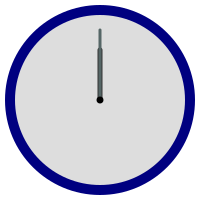
The following code example demonstrates how to generate an SVG image of an animated clock. <?xml version="1.0" encoding="utf-8" ?> <svg baseProfile="full" version="1.1"...
This post was originally published on jcutrer.com (WordPress) and has been migrated to the archive.
The following code example demonstrates how to generate an SVG image of an animated clock.
  -


.face-color {
fill: #DDD;
stroke: navy;
}
#hourHand {
stroke: #333;
}
#minuteHand {
stroke: #566;
}
Let’s take a look at what the above svg code does.
The “ element defines the SVG canvas with a width and height of 200 pixels and a viewBox attribute that sets the coordinate system to cover the entire canvas.
The “ element represents the clock face. It is positioned at the center of the canvas (cx=“100”, cy=“100”) with a radius of 90 pixels (r=“90”). It has a white fill color (fill=“#fff”) and a black stroke color (stroke=“#000”) with a stroke width of 10 pixels (stroke-width=“10”).
Two “ elements are used to create the hour and minute hands. The hour hand is defined by the first line (id=“hourHand”) and the minute hand by the second line (id=“minuteHand”). Both lines have their starting point at the center of the clock (x1=“100”, y1=“100”) and extend upwards. The hour hand is longer and reaches y2=“50”, while the minute hand is shorter and reaches y2=“30”. Both lines have black stroke colors (stroke=“#000”) and different stroke widths.
The “ element with a radius of 2 pixels (r=“2”) represents the center point of the clock. It is positioned at the center of the clock (cx=“100”, cy=“100”) and has a black fill and stroke color (fill=“#000”, stroke=“#000”) with a stroke width of 3 pixels (stroke-width=“3”).
The “ elements are used to animate the rotation of the hour and minute hands. The
xlink:hrefattribute refers to the hour and minute hand elements by their IDs (#hourHand and #minuteHand). TheattributeNameattribute is set to “transform” to modify the transformation of the elements. TheattributeTypeis set to “XML” to specify that the transformation is an XML attribute. Thetypeattribute is set to “rotate” to specify a rotation transformation. Thefromattribute defines the initial rotation angle (0 degrees) and rotation point (100, 100). Thetoattribute defines the final rotation angle (360 degrees, a full circle) and rotation point (100, 100). Thedurattribute specifies the duration of the animation in seconds. TherepeatCountattribute is set to “indefinite” to make the animation repeat indefinitely.The commented out “ element represents a second hand that is not included in the animation. It is similar to the hour and minute hands but has a shorter length (y2=“20”) and a thinner stroke width.
The “ block contains CSS rules that define the appearance of different elements. The
.face-colorclass sets the fill color of the clock face to a light gray (#DDD) and the stroke color to navy. The#hourHandand#minuteHandIDs set specific stroke colors for the respective hands.
Overall, the code creates a clock face with animated hour and minute hands, along with a stationary center point.
Comments are disabled (Giscus not yet configured).