· Networking · 5 min read
HP LaserJet Printer Telnet Commands
A default out-of-the-box HP network printer has a running telnet server that can be used to configure and control the printer. In this article, we will explore what commands are available and I will...
This post was originally published on jcutrer.com (WordPress) and has been migrated to the archive.
A default out-of-the-box HP network printer has a running telnet server that can be used to configure and control the printer. In this article, we will explore what commands are available and I will also show you how to disable the telnet server on the printer.
HP Printer Telnet Command Reference
Type "help or ?" for information.
Password:
> ?
__________HP LASERJET TELNET CONFIGURATION________
Product Name        :  HP LaserJet 200 color M251nw
Formatter Number    :  V150VRD
Serial Number       :  Cxxxxxxxxx
Firmware Datecode   :  20121026

=======================================
=====  Telnet Configuration Menu  =====
=====   Command:        Value:    =====
=======================================
?, help
/
#
save
exit
export

__________GENERAL SETTINGS________________________
passwd             (16 chars max)
sys-contact        alpha-numeric string (26 chars max)
sys-location       alpha-numeric string (32 chars max)
ssl-state          0 to disable, 1 to enable redirection
security-reset     1 to reset

__________802.11 WIRELESS ________________________
network-type       INFRASTRUCTURE, (AD_HOC not supported) (read-only)
desired-ssid       alpha-numeric string (32 chars max)
auth-type          AUTO, OPEN, SHARED
ssn-auth-type      NONE, WEP, WPA-PSK, WPA-802.1x, WPA2-PSK, WPA2-802.1x
svr-auth           NONE, PEAP, LEAP, EAP_TLS...
svr-auth-user      alpha-numeric string (128 chars max)
svr-auth-pass      alpha-numeric string (128 chars max)
svr-auth-id
dot1x              0 to disable, 1 to enable
psk-passphrase     string (8 chars min to 255 chars max)
encryption         0 to disable, 1 to enable (read-only)
wep-key-method     ASCII, (HEX not supported) (read-only)
wep-key            index (1..4) value (5 or 13 ASCII chars, 10 or 26 hex chars)
transmit-key       integer (1..4)
desired-channel    integer (1..14) (read-Only)

__________WIRELESS DIRECT ________________________
wireless-direct    0-OFF, 1-ON with Security, 2-ON without Security
wireless-direct-name    wireless direct print SSID (32 chars max)
wireless-direct-comm    0 to disable, 1 to enable (Allow clients to communicate with each other.)

__________TCP/IP MAIN_____________________________
host-name          alpha-numeric string (63 chars max)
ip-config          BOOTP, DHCP, AUTOIP, MANUAL
firewall-config    0 - Disable, 1 - Enabled by EWS (Read Only)
ip                 IP address in dotted notation
subnet-mask        IP address in dotted notation
default-gw         IP address in dotted notation
config-server      IP address in dotted notation (read-only)
tftp-server        IP address in dotted notation (read-only)
tftp-filename      ASCII string (64 chars max) (read-only)
parm-file          alpha-numeric string (64 chars max) (tftp only)
domain-name        alpha-numeric string (192 chars max)
pri-dns-svr        IP address in dotted notation
sec-dns-svr        IP address in dotted notation
pri-wins-svr       IP address in dotted notation
reconfig           1 (write only)

__________TCP/IP PRINT OPTION_____________________
9100-printing      0 to disable, 1 to enable (TCP port 9100)
ws-printing        0 to disable, 1 to enable (TCP port 3910)
ftp-printing       0 to disable, 1 to enable (TCP port 20,21)
ipp-printing       0 to disable, 1 to enable (TCP port 631)
lpd-printing       0 to disable, 1 to enable (TCP port 515)
banner             0 to disable, 1 to enable

__________TCP/IP ACCESS CONTROL __________________
acl-config         0 to disable, 1 to enable
allow              IP addressMask0/1, [0 to disable, 1 to enable]
acl-http           0 to disable, 1 to enable

__________TCP/IP OTHER____________________________
syslog-config      0 to disable, 1 to enable (UDP port 514)
syslog-svr         IP address in dotted notation
syslog-max         integer (1..999), default 10, 0 to disable
syslog-priority    integer (0..7), 8 to disable
syslog-protocol    integer (0,1) 0-PROTO_UDP,1-PROTO_TCP
syslog-port        integer (1..65535)
syslog-facility    integer (6 or 16-23)
slp-config         0 to disable, 1 to enable (UDP port 427)
bonjour-config     0 to disable, 1 to enable (UPD port5353)
bonjour-svc-name   alpha-numeric string (63 chars max)
bonjour-domain-name   alpha-numeric string (39 chars max) (read-only)
bonjour-services   1 - 9100 printing, 2 - IPP printing, 3 - LPD RAW printing,
                   5 - LPD AUTO, 6 - LPD BINPS
llmnr              0 to disable, 1 to enable
ftp-download       0 to disable, 1 to enable (TCP port 20, 21)
telnet-config      0 to disable, 1 to enable (tftp command only)
bootp-config       0 to disable, 1 to enable
dhcp-config        0 to disable, 1 to enable
autoip-config      0 to disable, 1 to enable
user-timeout       integer (5..7200) seconds, default 120 seconds
cold-reset-all     1 to reset printer to factory default
cold-reset-network 1 to reset printer network setting to factory default
ews-config         0 to disable, 1 to enable (TCP port 80)
dhcp-fqdn-conf     integer 0 - 3
airprint           0 to disable, 1 to enable

__________TCP/IP DIAGNOSTICS _____________________
last-config-ip     IP address in dotted notation. (read only)
dhcp-lease-time    integer, seconds (read only)

__________SNMP____________________________________
snmp-config        0 to disable, 1 to enable
     NOTE: Disabling this parameter will disable communication with WebJetAdmin
get-cmnty-name     alpha-numeric string (23 chars max)
set-cmnty-name     alpha-numeric string (23 chars max)
default-get-cmnty  0 to disable, 1 to enable
     NOTE: Disabling this parameter will disable communication with WebJetAdmin
auth-trap          0 to disable, 1 to enable
trap-dest          IP address in dotted notation, 0.0.0.0 to disable, [3]

__________OTHER __________________________________
link-type          AUTO, 100FULL, 100HALF, 10FULL, 10HALF
network-select     0-AUTO,1-RJ45,2-WIRELESS,3-USB (Read-Only)
job-timeout        integer (5..7200) seconds, default 120 seconds
ws-discovery-conf  0 to disable, 1 to enable

__________SUPPORT ________________________________
support-contact    alpha-numeric string (255 chars max)
support-number     alpha-numeric string (255 chars max)
support-url        URL string (255 characters max)
tech-support-url   URL string (255 characters max)

___________________________________________
Examples:
ip: 15.29.44.99
idle-timeout: 65
allow:
allow: 15.29.44.29   with IP, default mask]
allow: 15.29.40.29 255.255.248.0   with subnet mask]
cold-reset
passwd: j71fa j71fa
banner: 1
exit
(Read-Only) values may have been automatically set by BOOTP, DHCP or RARP.

>
Basic Commands to Use
?
Output the help screen featured above
/
Output the current printer configuration
export
Output the current configuration commands in a format that can be pasted back into the terminal
save
Commit any outstanding config changes to flash memory
cold-reset-all
reset printer to factory default settings
How to disable telnet on HP Printers
- Open the printer's web configuration interface
- Navigate to the **Networking | Advanced** settings page.
- Uncheck **Telnet Configuration** and click **Apply**
!(http://jcutrer.com/wp-content/uploads/2017/10/hp-printer-disable-telnet-access.png)
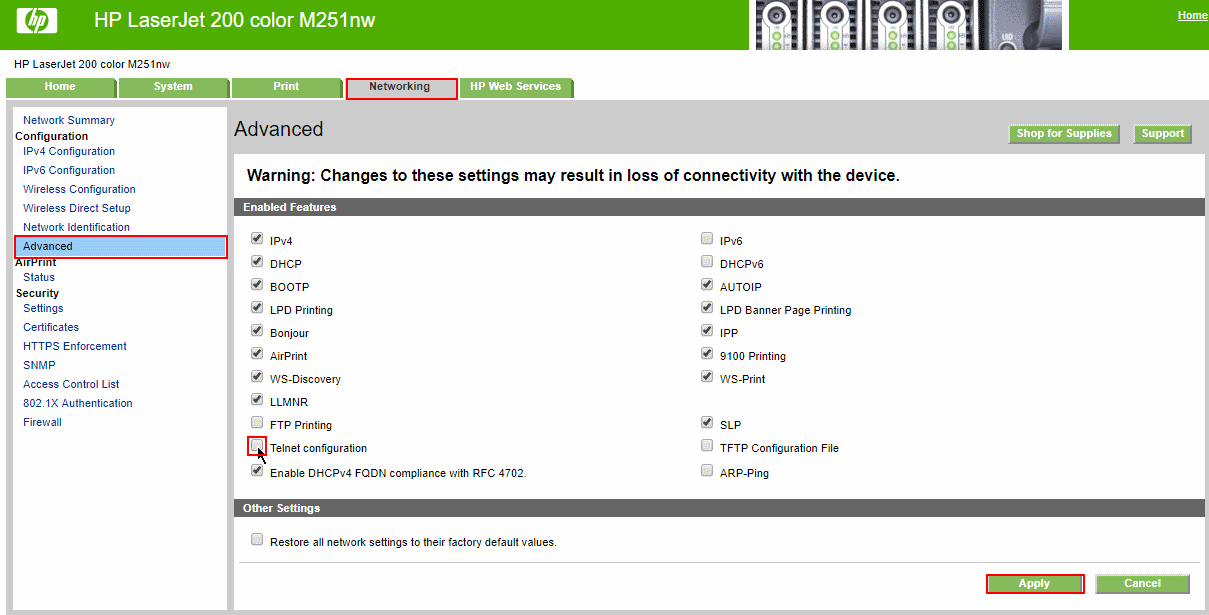
Finally, reconnect to confirm that telnet is disabled. The printer will still listen on TCP port 23 but you should see a message stating “Telnet is disabled.”
Comments are disabled (Giscus not yet configured).