· MikroTik Tutorial · 6 min read
MikroTik Script: Push Router Stats to dweet.io
In this tutorial, I will show you how to create a RouterOS script to push Router statistics up to dweet.io and then use that data to create a nice monitoring dashboard with slick gauges and graphs...
This post was originally published on jcutrer.com (WordPress) and has been migrated to the archive.
In this tutorial, I will show you how to create a RouterOS script to push Router statistics up to dweet.io and then use that data to create a nice monitoring dashboard with slick gauges and graphs over at freeboard.io. Disclaimer: dweet.io data feeds are public so consider this before pushing any sensitive data up to dweet.io. They do have a commercial accounts in which you can lock (make private) data feeds. freeboard.io dashboards are public by default but can be make private. Also, this script is provided as-is, use at your own risk.
MikroTik Script to push router stats to dweet.io
#
# MikroTik RouterOS Script
# This script has two parts: 1) RouterOS statistics collector 2) Push router stats up to dweet.io
#
# This script can be adapted to send the collected statistics to any NMS system that supports
# receiving data via http get/post requests.
#
# Tested on RouterOS v6.40.3
# Learn more about this script and dweet.io by reading...
# http://jcutrer.com/howto/networking/mikrotik/mikrotik-script-dweet-io-stats
#
# Script Revision: 1.0.2
# Author Name: Jonathan Cutrer
# Author URL: http://jcutrer.com
#
# Change Log
#
# 1.0.2 Reworked stats collection in groups, you can turn each on/off below
# Changed dweet.io call to use SSL (https://)
# Added VPN stats collection
# Added Health stats collection
# Added Routing Protocol stats collection
#
# 1.0.1 Added keep-result=no to last line
#
# 1.0.0 Initial Release
#
#
# Begin Setup
#
:local interfaceWAN "ether1";
:local interfaceWLAN "wlan1";
:local interfaceWLANGuest "wlan2";
:local prefix "mikrotik-stats";
:local dweetURL "https://dweet.io/dweet/for/";
:local dataParams;
#
# Collection Groups
# Define what gets groups of statistics get collected and sent
#
:local enBoard true
:local enPerf true
:local enHealth true
:local enRouter true
:local enRouting true
:local enFirewall true
:local enWireless true
:local enVPN true
#
# End Setup
#
# Collect Stats: Board
#
:local boardData; :local identity; :local model; :local serial;
if ( $enBoard ) do={
:put "Collecting Board data..."
:set identity ;
:set model ;
:set serial ;
:set boardData "identity=$identity&model=$model&serial=$serial"
:set dataParams $boardData;
}
# Set the thing name
:local thing "$prefix-$serial"
#
# Collect Stats: Perf
#
:local perfData; :local cpuLoad; :local memFree; :local uptime;
if ( $enPerf ) do={
:put "Collecting Performance data..."
:delay 5
:set cpuLoad ;
:set memFree ;
:set uptime ;
:set perfData "cpu-load=$cpuLoad&uptime=$uptime&mem-free=$memFree"
:set dataParams ( $dataParams . "&" . $perfData);
}
#
# Collect Stats: Health
#
:local healthData; :local volts; :local amps; :local watts; :local temp; :local cpuTemp; :local fanSpeed;
if ( $enHealth ) do={
:put "Collecting Health data..."
:set volts ;
:set amps ;
:set watts ;
:set temp ;
:set cpuTemp ;
:set fanSpeed ;
:set healthData "volts=$volts&s=$amps&watts=$watts&temp=$temp&cpu-temp=$cpuTemp&fan-speed=$fanSpeed"
:set dataParams ( $dataParams . "&" . $healthData);
}
#
# Collect Stats: Router
#
:local routerData; :local ipRoutes;
if ( $enRouter ) do={
:put "Collecting Router data..."
:set ipRoutes [:len ];
:set routerData "ip-routes=$ipRoutes"
:set dataParams ( $dataParams . "&" . $routerData);
}
#
# Collect Stats: Routing
#
:local routingData; :local bgpPeers; :local ospfNeighbors;
if ( $enRouting ) do={
: put "Collecting Routing Protocol data..." ;
:set bgpPeers [:len ];
:set ospfNeighbors [:len ];
:set routingData "bgp-peers=$bgpPeers&ospf-neighbors=$ospfNeighbors";
:set dataParams ( $dataParams . "&" . $routingData);
}
#
# Collect Stats: Wireless
#
:local wirelessData; :local wlanClients; :local wlanGuests;
if ( $enWireless ) do={
:put "Collecting Wireless data...";
:set wlanClients ;
:set wlanGuests ;
:set wirelessData "wlan-clients=$wlanClients&wlan-guests=$wlanGuests";
:set dataParams ( $dataParams . "&" . $wirelessData);
}
#
# Collect Stats: Firewall
#
:local firewallData; :local ipFwConx;
if ( $enFirewall ) do={
:put "Collecting Firewall data...";
:set ipFwConx ;
:set firewallData "ip-fw-conx=$ipFwConx";
:set dataParams ( $dataParams . "&" . $firewallData);
}
#
# Collect Stats: VPN
#
:local vpnData; :local vpnPppConx; :local vpnIpsecPeers; :local vpnIpsecPolicy;
if ( $enFirewall ) do={
:put "Collecting VPN data...";
:set vpnPppConx [:len ];
:set vpnIpsecPeers [:len ];
:set vpnIpsecPolicy [:len ];
:set vpnData "vpn-ppp-conx=$vpnPppConx&vpn-ipsec-peers=$vpnIpsecPeers&vpn-ipsec-policys=$vpnIpsecPolicy";
:set dataParams ( $dataParams . "&" . $vpnData);
}
#
# Test Output of Collected Data
#
:put $boardData
:put $perfData
:put $healthData
:put $routerData
:put $routingData
:put $wirelessData
:put $firewallData
:put $vpnData
#
# Build the Final Request URL
#
:local finalURL;
:set finalURL "$dweetURL$thing?$dataParams"
# print the final url
:put $finalURL
#
# Push data to dweet.io
#
/tool fetch url="$finalURL" mode=https keep-result=no
# end of scriptInstall the script
- In Winbox, click System | Scripts
- From the Script List, click the Add (+) toolbar button
- Paste in the above script and name it “dweet-stats”!(/wp-content/uploads/2017/11/mikrotik-script-push-dweet-stats.png)
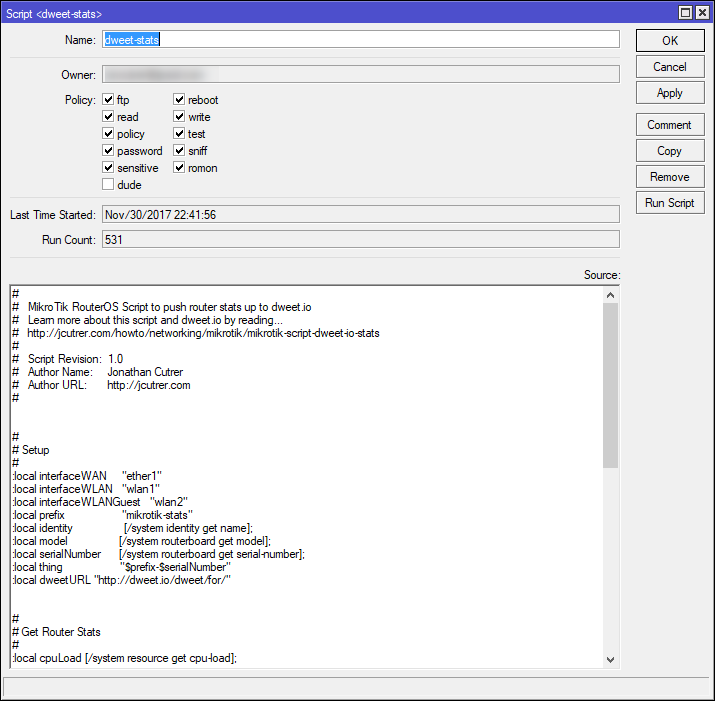
Before we create the schedule, you will want to adjust the Setup section of the scripts and make sure it executes without error. My WAN interface name is ether1 but some RouterOS configs name it ether1-gateway or you may be using a different interface for your WAN port. The above script also assumes that your wireless interface is named wlan1 and that you have a guest wireless interface wlan2. If you run into problems or have no wireless interfaces on your router just comment out those lines and adjust the finalurl variable to exclude that data.
Test Execute the script
- In WinBox, click New Terminal
- Paste in
/system script run dweet-statsand press
The script should execute without syntax errors and give you output similar to this…
> /system script run dweet-stats
Collecting Board data...
Collecting Performance data...
Collecting Health data...
Collecting Router data...
Collecting Routing Protocol data...
Collecting Wireless data...
Collecting Firewall data...
Collecting VPN data...
identity=R1&model=1100AHx2&serial=341102911117
cpu-load=2&uptime=2w3d08:18:34&mem-free=1557213184
volts=118&s=801&watts=94&temp=23&cpu-temp=33&fan-speed=3199
ip-routes=190
bgp-peers=0&ospf-neighbors=3
wlan-clients=0&wlan-guests=0
ip-fw-conx=30
vpn-ppp-conx=0&vpn-ipsec-peers=2&vpn-ipsec-policys=5
https://dweet.io/dweet/for/mikrotik-stats-341102911117?identity=R1&model=1100AHx2&serial=3411029CC647&cpu-load=2&uptime=2w3d08:18:34&mem-free=1557213184
&volts=118&s=801&watts=94&temp=23&cpu-temp=33&fan-speed=3199&ip-routes=190&bgp-peers=0&ospf-neighbors=3&wlan-clients=0&wlan-guests=0&ip-fw-conx=30&vpn-ppp-
conx=0&vpn-ipsec-peers=2&vpn-ipsec-policys=5
status: finished
downloaded: 0KiBC-z pause]
total: 0KiB
duration: 0s
>Schedule the script to run every X minutes or seconds
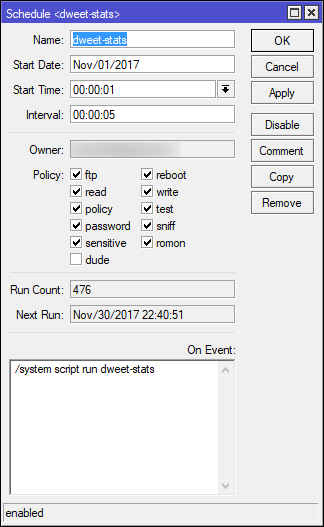
- In Winbox, click System | Scheduler
- From the Script List, click the Add (+) toolbar button
- Name the schedule “run-dweet-stats” and set the Interval: ie. 00:01:00 = Every 1 minute
- Paste
/system script run dweet-statsinto the On Event: box!(/wp-content/uploads/2017/11/mikrotik-schedule-dweet-script.png)
View your router stats on dweet.io
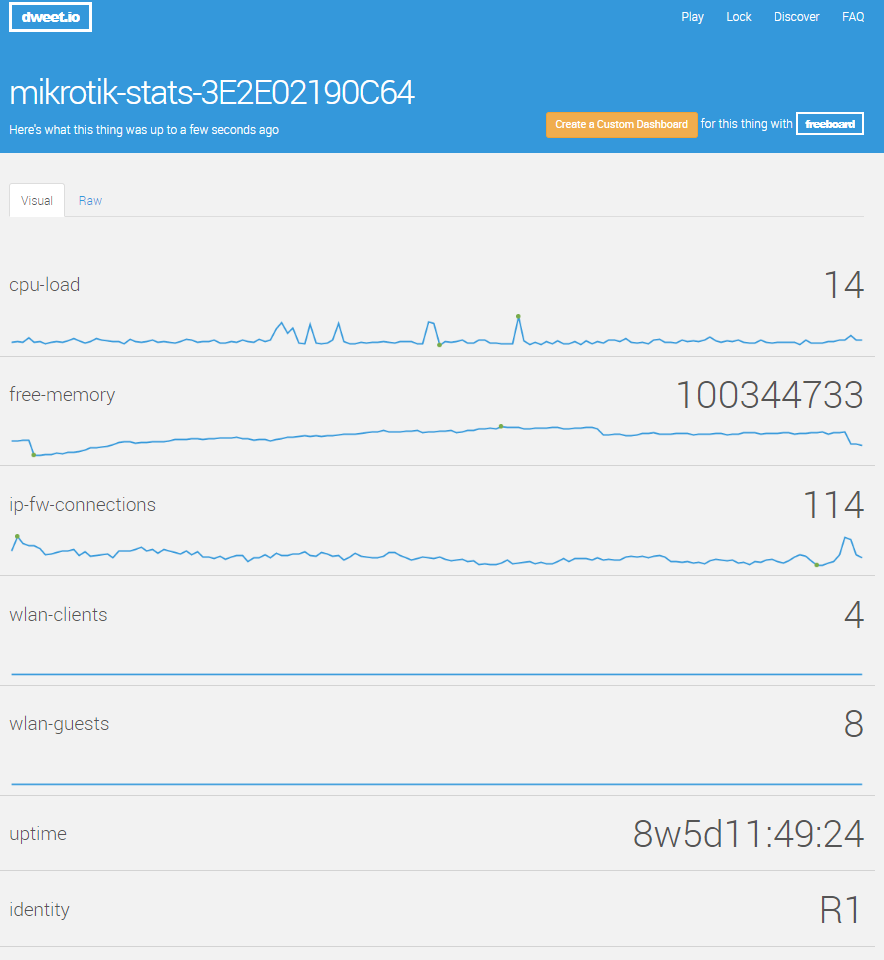
Your router’s data will land at http://dweet.io/follow/mikrotik-stats-
Here is what you can expect to see (http://dweet.io/follow/mikrotik-stats-3E2E02190C64) !(/wp-content/uploads/2017/11/mikrotik-iot-data-stream-dweet.png) Click to Enlarge
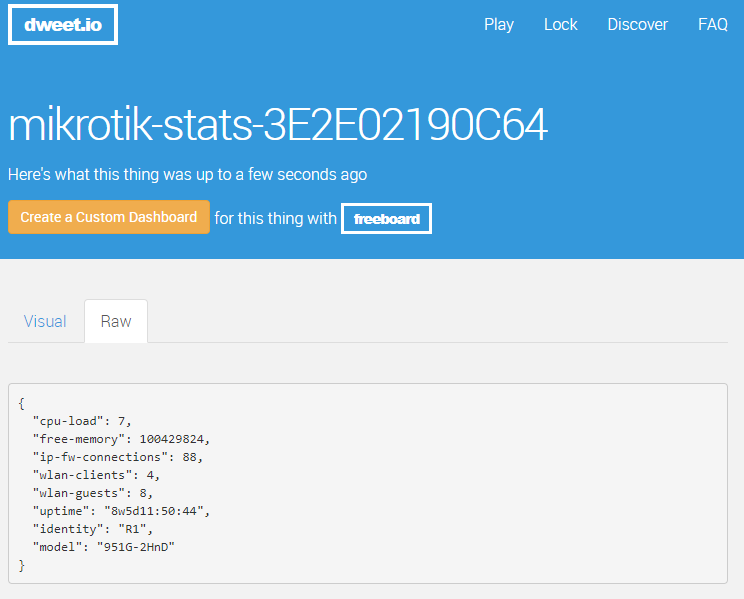
You can also see the raw data that is being submitted by clicking on the Raw tab.
!(/wp-content/uploads/2017/11/mikrotik-dweet.io-raw-data.png)
A Real Time Dashboard for your Router Stats
Next, we can work with the dweet data to build a dashboard with freeboard.io. Checkout the one I created here (https://freeboard.io/board/5a20d586511f114a61002d82). !(/wp-content/uploads/2017/11/mikrotik-router-freeboard-dashboard.png) Click to Enlarge
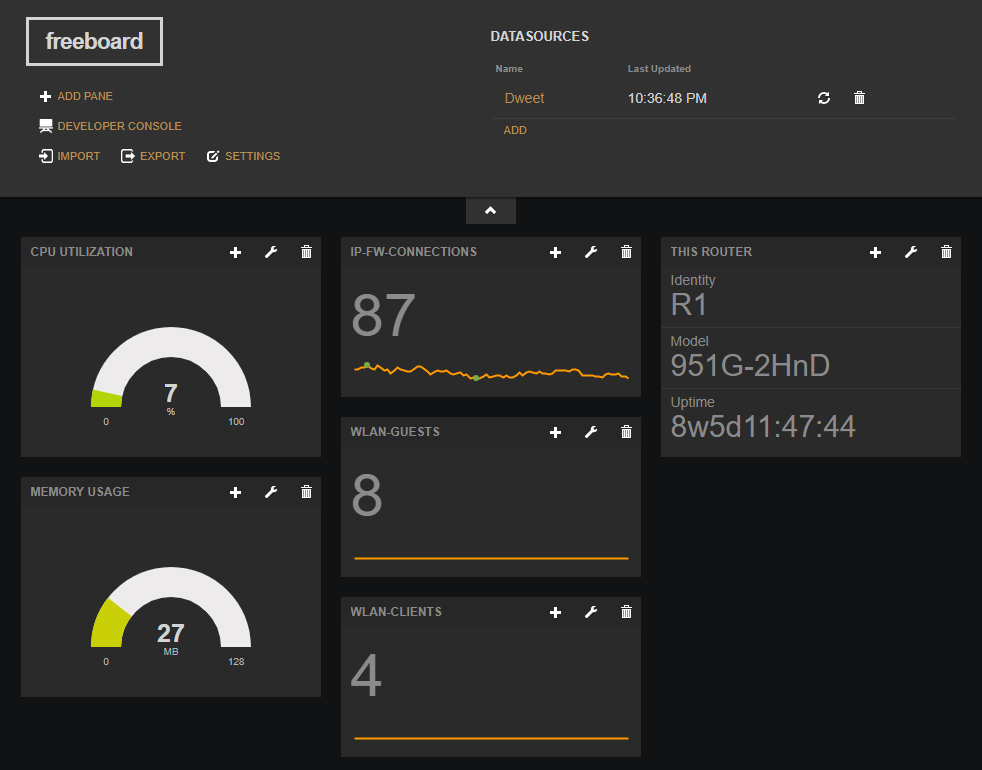
To create your own dashboard you can click the big orange button on your dweet.io thing page or you can clone my dashboard and change the datasource to your dweet.io thing name.
!(/wp-content/uploads/2017/11/create-clone-freeboard-io.png)
Future Enhancements
I plan on adding WAN interface TX/RX utilization stats to the script. What else do you think would be useful? comment below
Reference
Comments are disabled (Giscus not yet configured).