· MikroTik Tutorial · 2 min read
MikroTik: L2TP/IPsec VPN Firewall Rules
When you configure a L2TP/IPSec VPN on a MikroTik RouterOS device you need to add several IP Firewall (Filter) rules to allow clients to connect from outside the network. L2TP/IPSec Firewall Rule Set...
This post was originally published on jcutrer.com (WordPress) and has been migrated to the archive.
When you configure a L2TP/IPSec VPN on a MikroTik RouterOS device you need to add several IP Firewall (Filter) rules to allow clients to connect from outside the network.
L2TP/IPSec Firewall Rule Set
/ip firewall filter
add action=accept chain=input in-interface=ether1 protocol=ipsec-esp \
    comment="allow L2TP VPN (ipsec-esp)"
add action=accept chain=input dst-port=1701 in-interface=ether1 protocol=udp \
    comment="allow L2TP VPN (1701/udp)"
add action=accept chain=input dst-port=4500 in-interface=ether1 protocol=udp \
    comment="allow L2TP VPN (4500/udp)"
add action=accept chain=input dst-port=500 in-interface=ether1 protocol=udp \
    comment="allow L2TP VPN (500/udp)"
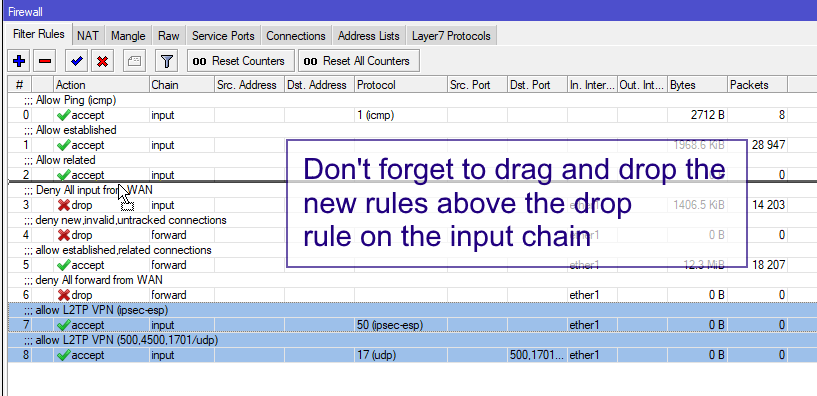
These rules must be placed above any deny rules on the “input” chain.
The ruleset can be further condensed by combining the 3 udp rules into one.
/ip firewall filter
add action=accept chain=input in-interface=ether1 protocol=ipsec-esp \
    comment="allow L2TP VPN (ipsec-esp)"
add action=accept chain=input dst-port=500,1701,4500 in-interface=ether1 protocol=udp \
    comment="allow L2TP VPN (500,4500,1701/udp)"
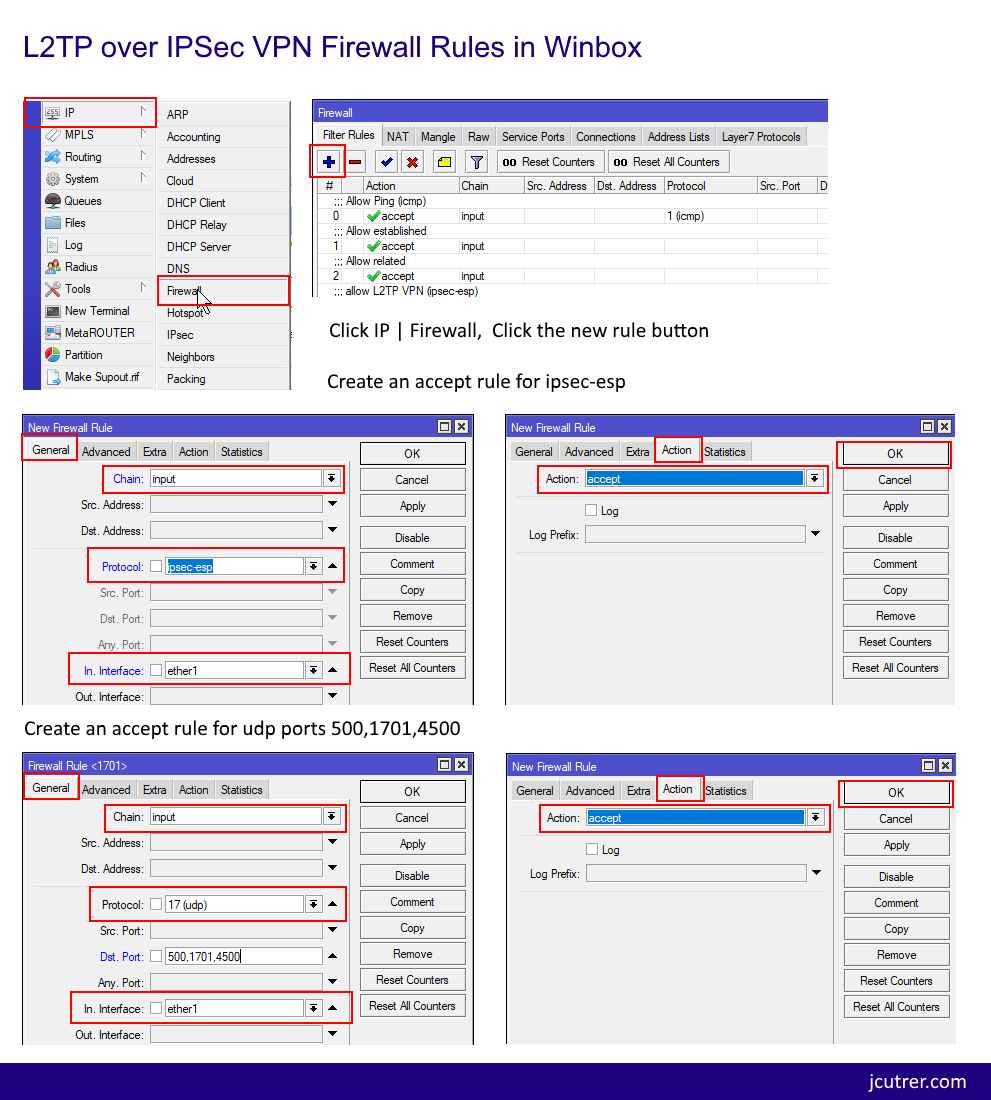
Add these firewall rules in Winbox
If you want to avoid pasting commands into the cli you can create these firewall rules in winbox, here are some screenshots. !(/wp-content/uploads/2017/11/l2tp-ipsec-firewall-rules-winbox-screenshots-923x1024.png) Winbox Screenshots - Click to Enlarge
Important: Don’t forget to reorder your input rules!
!(/wp-content/uploads/2017/11/l2tp-ipsec-reorder-firewall-rules-winbox.png)
I hope you found this MikroTik Tutorial about L2TP/IPsec VPN Firewall Rules useful. If it helped you out, please leave a comment below and checkout my other (/howto/networking/mikrotik/)!
Comments are disabled (Giscus not yet configured).