· Linux · 2 min read
How to upgrade to python 3.7 on ubuntu 18.10
Ubuntu 18.10 ships with python 3.6.7, here is how to install python 3.7 and configure it as the default version of python Before getting started, run the following command to see what version of...
This post was originally published on jcutrer.com (WordPress) and has been migrated to the archive.
Ubuntu 18.10 ships with python 3.6.7, here is how to install python 3.7 and configure it as the default version of python
Before getting started, run the following command to see what version of python3 you are running.
python3 -V Python 3.6.7
NOTE: Some comments below have warned that using update-alternatives to switch from python 3.6 to python 3.7 will cause problems for some (Ubuntu Desktop) GUI applications that are linked to python 3.6. This guide is targeted at non-graphical ubuntu servers and works great as far as I’ve tested.
You can still install and use python 3.7 on Ubuntu Desktop machine just skip the update-alternatives steps below. To use 3.7 instead of 3.6 just execute python3.7 directly, create a virtualenv or use pipenv.
Install Python 3.7
Steps to install python3.7 and configure it as the default python3 interpreter. - Install the python3.7 package using apt-get
sudo apt-get install python3.7
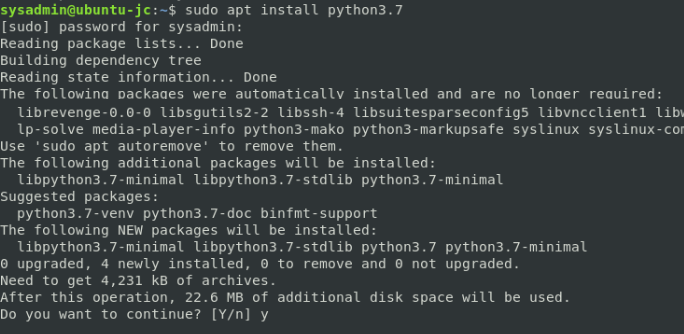 - Add python3.6 & python3.7 to update-alternatives
sudo update-alternatives --install /usr/bin/python3 python3 /usr/bin/python3.6 1 sudo update-alternatives --install /usr/bin/python3 python3 /usr/bin/python3.7 2 - Update python3 to point to python3.7
sudo update-alternatives --config python3 Enter 2 for python3.7
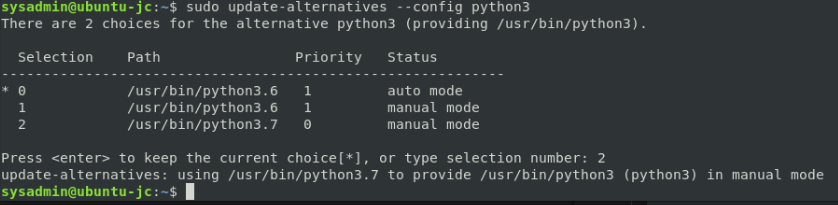 - Test the version of python
python3 -V Python 3.7.1

Now you should have the latest stable version of python running on your Ubuntu linux server. (#comments) below and checkout my other (/howto/linux/).
Comments are disabled (Giscus not yet configured).