· Windows · 1 min read
How-to Live Migrate VMs between two Hyper-V hosts with different processors
In this article, we configure a Hyper-V VM to support live migration between Failover Cluster nodes when the two nodes have non-matching CPUs. This example is relevant to Hyper-V Failover Cluster...
This post was originally published on jcutrer.com (WordPress) and has been migrated to the archive.
In this article, we configure a Hyper-V VM to support live migration between Failover Cluster nodes when the two nodes have non-matching CPUs. This example is relevant to Hyper-V Failover Cluster environments where two hosts are configured as cluster nodes and the VM is configured as a Virtual Machine Cluster Role.
- With the VM powered off, open the VM settings dialog.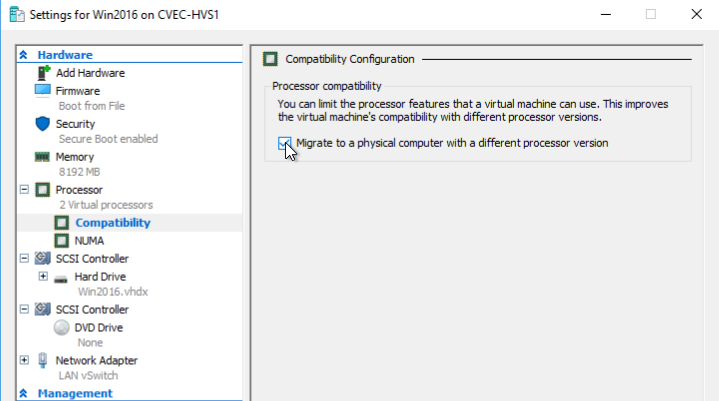
- Expand the **Processor** section and select **Compatibility**
- Check the box labeled "Migrate to a physical computer with a different processor version"Now you can live migrate (move) the VM between two Hyper-V servers with different CPU processors versions.
Comments are disabled (Giscus not yet configured).