· Windows · 1 min read
Windows 10: NUMLOCK on startup registry key
In previous versions of Windows, the NumLock keyboard key could be set ON at startup in the system BIOS settings. Here is the registry key to change num lock key behavior for all users in Windows 10...
This post was originally published on jcutrer.com (WordPress) and has been migrated to the archive.
In previous versions of Windows, the NumLock keyboard key could be set ON at startup in the system BIOS settings. Here is the registry key to change num lock key behavior for all users in Windows 10.
Registry Key to turn Num Lock ON at Startup
Windows Registry Editor Version 5.00

"InitialKeyboardIndicators"="2"
The default value for the registry key InitialKeyboardIndicators is “2147483648”
Steps to change Num Lock key behavior in Windows 10
- Click Start and type "regedit"
- Click on and run **regedit**
- Navigate to `HKEY_USERS\.DEFAULT\Control Panel\Keyboard`
- Double-click the registry key **InitialKeyboardIndicators**
- Change the value to "2" for ON, click **OK** and close regedit
- Reboot the Computer
!(/wp-content/uploads/2017/11/numlocks-registry-key.png)
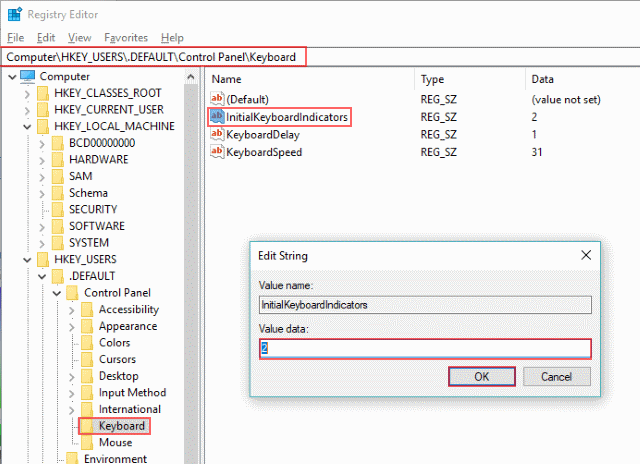
Here are the possible values for InitialKeyboardIndicators
Value Meaning
0 NUMLOCK is off.
2 NUMLOCK is on.
Comments are disabled (Giscus not yet configured).