· Windows · 3 min read
Uninstall KB4056892 on Windows 10 - Intel Meltdown, Spectre Bug Patch
Microsoft and many other major vendors have released rushed updates to address the highly publicized Intel processor security vulnerability "Meltdown". This update is expected to slow down your Intel...
This post was originally published on jcutrer.com (WordPress) and has been migrated to the archive.
Microsoft and many other major vendors have released rushed updates to address the highly publicized Intel processor security vulnerability “Meltdown”. This update is expected to slow down your Intel processor by 15-30% and render most AntiVirus unusable. Windows 10 will give you no choice but to install this update but you can manually uninstall it.
Updated 01/29/2018: Microsoft released (https://support.microsoft.com/en-us/help/4078130/update-to-disable-mitigation-against-spectre-variant-2), that specifically disables Spectre variant 2 mitigations. Intel says this should resolve random reboots and blue screens on Intel-based Broadwell and Haswell processors. The patch will not be delivered via automatic windows update and must be installed manually. (https://www.catalog.update.microsoft.com/Search.aspx?q=KB4078130)
Steps to uninstall KB4056892 in Windows 10
- Click Start and type "cmd"
- Right-click **Command Prompt** and choose **Run as administrator**
- Type "**wusa /uninstall /kb:4056892**" and press enter
- Answer **Yes** to uninstall & restart when prompted
* Run “wusa /uninstall /kb:4056892” from an elevated command prompt - Click to Enlarge
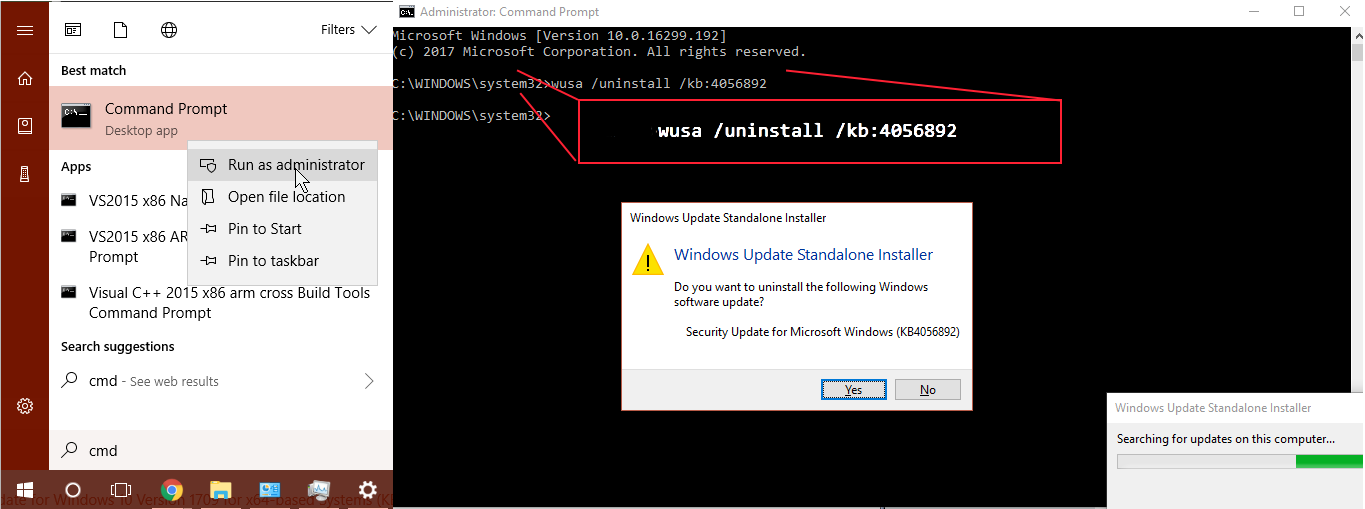
This command can be used to uninstall any unwanted Windows 10 updates but it’s likely the update will be reinstalled again in the near future unless you (#pause-updates).
If you are not running the latest 1709 build of Windows 10 this update will come with a different KB number. Here are the Intel Meltdown/Spectre patch KB numbers by Window 10 build version.
https://twitter.com/WZorNET/status/948818992722055168
How to Pause Windows Update in Windows 10
- Click **Start | Settings**
- Click **Update & Security**
- From the Windows Update Settings page click **Advanced Options**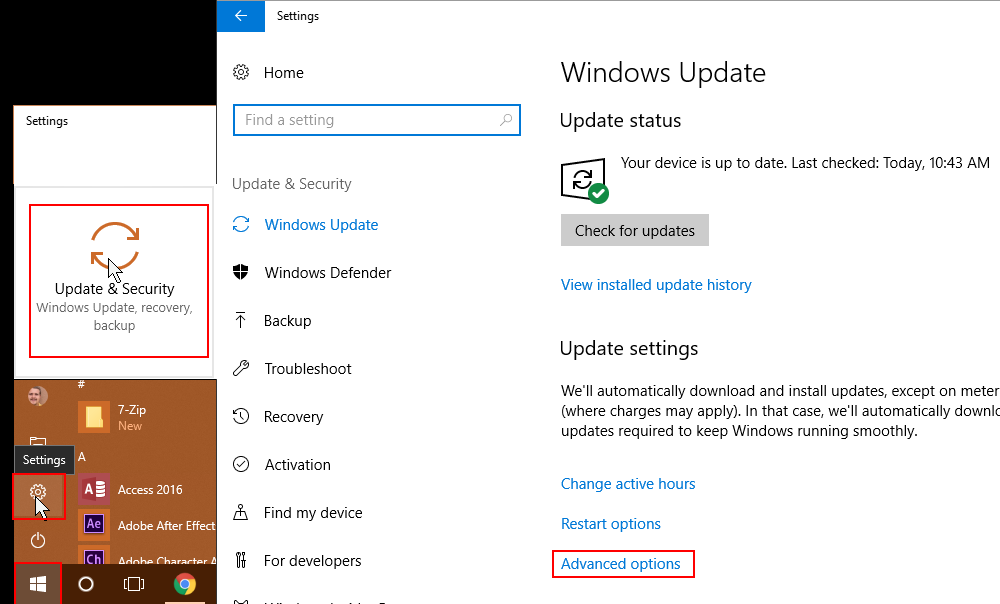 - Toggle the Pause Updates switch to On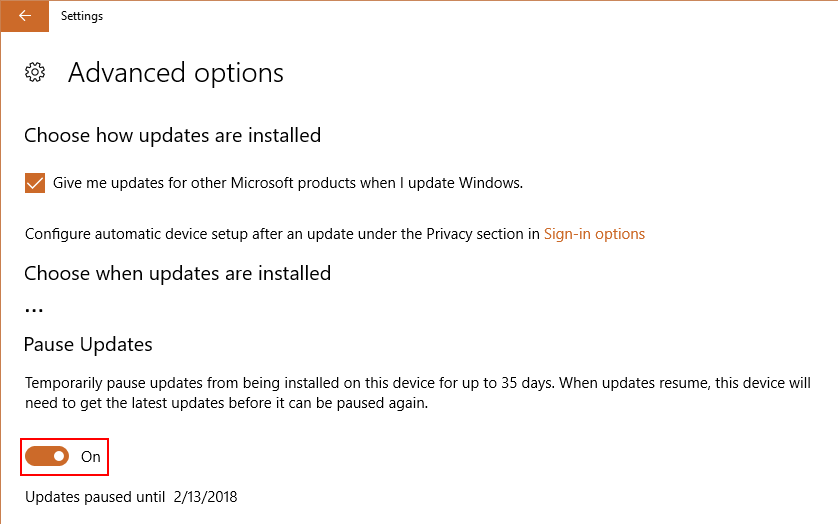
Updated 1/10/2018:
- The **Intel Meltdown Patch**(delivered via Windows Update on Jan 3rd 2018)* is causing blue screens *(and a lot of pain)***on AMD Athlon systems**. In some cases, the AMD machine **becomes unbootable**. Microsoft has pulled the update for PCs with AMD Processors and issued the following warning.
-
Microsoft has reports of some customers with AMD devices getting into an unbootable state after installing this KB. To prevent this issue, Microsoft will temporarily pause Windows OS updates to devices with impacted AMD processors at this time.Microsoft is working with AMD to resolve this issue and resume Windows OS security updates to the affected AMD devices via Windows Update and WSUS as soon as possible. If you have experienced an unbootable state or for more information see (https://support.microsoft.com/en-us/help/4073707). For AMD specific information please contact AMD.
- Microsoft @ CES2018 also said that the patch (KB4056894) will cause greater performance hits on older Windows 7, Windows 8 machines [(http://www.zdnet.com/article/microsoft-says-older-windows-versions-face-greatest-meltdown-spectre-performance-issues/)]NVidia GPUs also affected by the Meltdown vulnerability [(https://nvidia.custhelp.com/app/answers/detail/a_id/4611)]List of Intel Meltdown Patch KB NumbersKB Applies to
KB4056892 Windows 10 version 1709
KB4056891 Windows 10 version 1703
KB4056890 Windows 10 version 1607 & Server 2016
KB4056888 Windows 10 version 1511 Enterprise & Education editions
KB4056893 Windows 10 version 1507 LTSC
KB4056895 Windows 8.1 & Server 2012 R2
KB4056898 Windows 8.1 & Server 2012 R2
KB4056894 Windows 7 & Server 2008 R2
KB4056897 Windows 7 & Server 2008 R2
Meltdown Patch on Windows Server and Hyper-V Hosts
The steps to install the meltdown patch on Windows Servers are a bit more involved than just installing the updates. The kernel-user space splitting feature is NOT on by default. Microsoft has supplied detailed steps and some caveats to this process that need to be followed.
Carefully read (https://www.saotn.org/important-note-windows-update-kb4056892/) and (https://support.microsoft.com/en-gb/help/4072698/windows-server-guidance-to-protect-against-the-speculative-execution) before attempting to install these patches on Windows Server 2016, 2012, or 2008 R2. Microsoft also provides a PowerShell module Install-Module SpeculationControl that automates some of the steps involved.
References
- (https://www.ghacks.net/2015/04/17/how-to-remove-windows-10-upgrade-updates-in-windows-7-and-8/)
- (https://support.microsoft.com/en-us/help/4056892/windows-10-update-kb4056892)
- (https://meltdownattack.com/)
- (https://googleprojectzero.blogspot.com/2018/01/reading-privileged-memory-with-side.html)
- (https://support.microsoft.com/en-gb/help/4072698/windows-server-guidance-to-protect-against-the-speculative-execution)
- (/wp-content/uploads/2018/01/KB4056892-filenames.pdf)Comments are disabled (Giscus not yet configured).