· Windows · 1 min read
How to uninstall Xbox app in Windows 10 without PowerShell
For some reason, Microsoft disabled the ability to Uninstall Xbox app that comes preinstalled with Windows 10. There are PowerShell scripts on the web that will allow you to remove it but there is...
This post was originally published on jcutrer.com (WordPress) and has been migrated to the archive.
For some reason, Microsoft disabled the ability to Uninstall Xbox app that comes preinstalled with Windows 10. There are PowerShell scripts on the web that will allow you to remove it but there is actually an easier way. 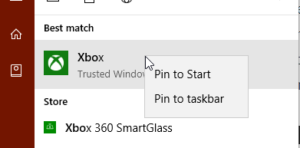 Ccleaner, a popular disk cleanup tool has some little know advanced tools including Uninstall. Ccleaner is free, if you don’t already have it you can download and install it from (https://www.piriform.com/ccleaner).
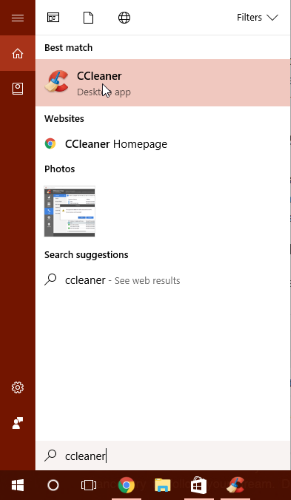
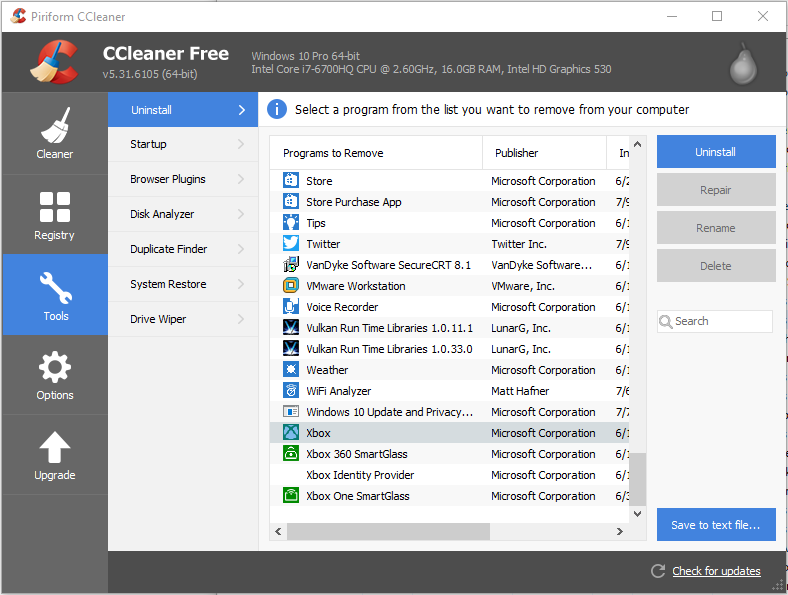
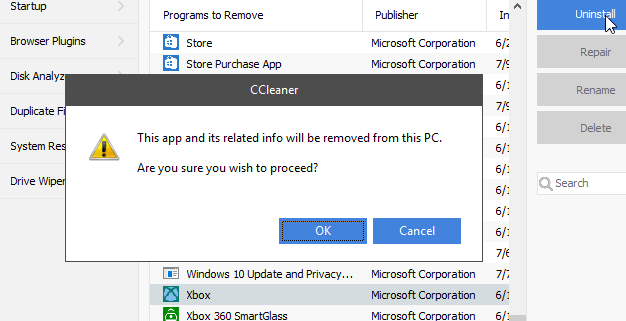
Here are the steps to uninstall the built-in Xbox app in Windows 10.
- Launch **Ccleaner** and click on the **Tools** menu.!(http://jcutrer.com/wp-content/uploads/2017/07/uninstall-xbox-with-ccleaner-step1.png) Launch Ccleaner - Find and highlight the Xbox app in the list of installed applications !(http://jcutrer.com/wp-content/uploads/2017/07/uninstall-xbox-with-ccleaner-step2.png) - Click “Uninstall” and confirm. !(http://jcutrer.com/wp-content/uploads/2017/07/uninstall-xbox-with-ccleaner-step3.png) - Repeat above steps to also Uninstall Xbox 360 SmartGlass, Xbox Identity Provider, and Xbox One SmartGlass.
That’s it! No PowerShell, no terminal windows, just point and click. :) You can use the same technique to uninstall other Windows 10 built-in apps including Groove Music, MSN Money, MSN Weather, Bing Maps. Do you have another technique you use to uninstall Windows 10 apps? (#comments) or read more (/windows/)
References
- (https://www.piriform.com/news/blog/2016/07/29/let-ccleaner-remove-the-windows-10-default-apps-you-can-t-get-rid-of?utm_medium=social&utm_source=twitter&utm_campaign=blog&utm_content=09012017)
- (https://www.piriform.com/ccleaner)Comments are disabled (Giscus not yet configured).